
外观
学术资源加速
Github 镜像站
ghfast.top
下载资源时只需要在当前的连接里加上 https://ghfast.top/ 前缀即可。点击 ghfast.top 查看更多使用文档。
例子
克隆代码
bash
git clone https://github.com/XuehaiPan/nvitop

改为

git clone https://ghfast.top/https://github.com/XuehaiPan/nvitop下载文件
bash
wget https://raw.githubusercontent.com/k8snetworkplumbingwg/multus-cni/master/deployments/multus-daemonset.yml

改为

wget https://ghfast.top/https://raw.githubusercontent.com/k8snetworkplumbingwg/multus-cni/master/deployments/multus-daemonset.yml下载 release 包
bash
wget https://github.com/redis/redis/archive/refs/tags/8.4.0.tar.gz

改为

wget https://ghfast.top/https://github.com/redis/redis/archive/refs/tags/8.4.0.tar.gzgh-proxy.com
使用方法跟上面差不多,可以点击进入 gh-proxy.com 查看更详细的教程。
HuggingFace 镜像站:
自建梯子
大家可以自行搜索 clash for linux 的教程,也可按照下面的步骤自行配置代理。
1. 初始化
下载 clash 安装包
由于 github.com 时常被阻断,这里使用 ghfast.top 代理下载。
bash
apt install -y git curl

git clone https://ghfast.top/https://github.com/wnlen/clash-for-linux.git
cd clash-for-linux修改配置文件
bash
vim .env  # 编辑配置文件

> CLASH_URL=""     # 🔥 订阅地址。
> CLASH_SECRET=""  # 🔥 Dashboard 面板登录密码,如果为空,clash 会生成一个长密码。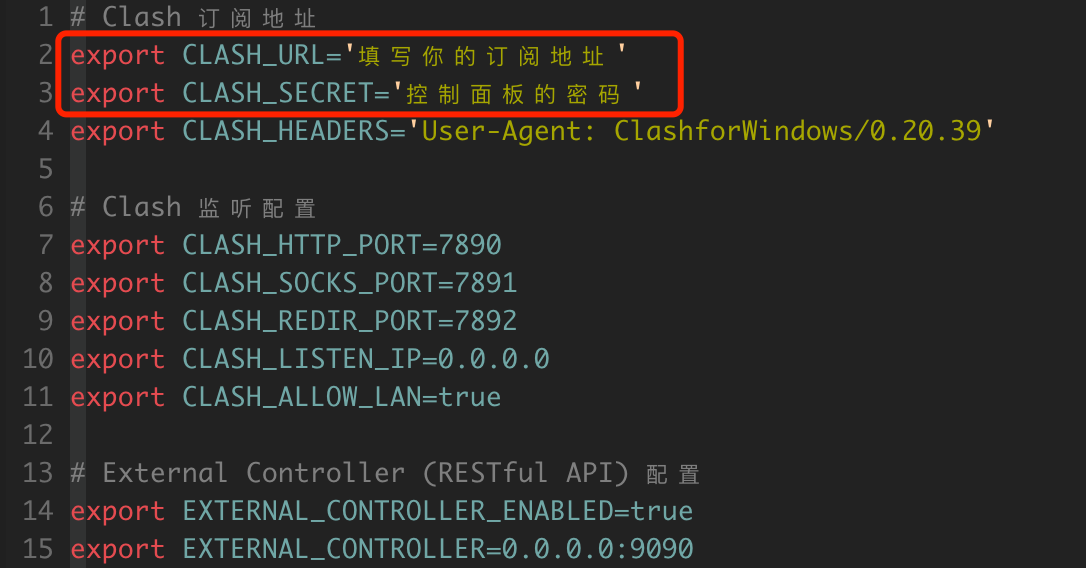
⭐️ 免费的订阅地址:
- https://ghfast.top/https://github.com/free-nodes/clashfree/raw/refs/heads/main/clash.yml
- https://ghfast.top/https://raw.githubusercontent.com/PuddinCat/BestClash/refs/heads/main/proxies.yaml
启动代理服务
bash
bash start.sh                      # 启动 clash client
/etc/profile.d/clash-for-linux.sh # 加载环境变量📢 代理服务启动后,并不会直接转发流量。 需要先配置 http_proxy 环境变量,这样其他客户端才会识别到代理,之后的流量就会走代理。
同步 GEO 数据库
如果需要更新 GEO 数据库,则可以用下面的方法同步。
bash
wget https://ghfast.top/https://raw.githubusercontent.com/Loyalsoldier/geoip/release/GeoLite2-Country.mmdb -O conf/Country.mmdbcountry 数据库详情 https://github.com/Loyalsoldier/geoip?tab=readme-ov-file
2. 启用代理
配置 http 代理,该代理只对 http/https 协议有效,另外只对当前 shell 有效果。如果重新开了 shell,需要重新配置。
bash
proxy_on也可手动按需配置环境变量。
bash
export http_proxy=http://0.0.0.0:7890
export https_proxy=http://0.0.0.0:7890
export no_proxy=127.0.0.1,localhost
export HTTP_PROXY=http://0.0.0.0:7890
export HTTPS_PROXY=http://0.0.0.0:7890
export NO_PROXY=127.0.0.1,localhost
echo -e "\033[32m[√] 已开启代理\033[0m"clash 默认还会启动 socks 和 redir 代理。
bash
export CLASH_HTTP_PORT=7890

export CLASH_SOCKS_PORT=7891
export CLASH_REDIR_PORT=78923. 测试
bash
curl -v https://www.github.com

curl -v https://www.google.com4. 取消代理
取消代理其实就是注释掉 http_proxy 相关的环境变量。
⚠️ 取消代理后,新的命令不会生效,但已执行的命令依旧识别到该变量。建议把相关命令和服务重启。
bash
proxy_off也可手动取消代理配置。
bash
unset http_proxy
unset https_proxy
unset no_proxy
unset HTTP_PROXY
unset HTTPS_PROXY
unset NO_PROXY
echo -e "\033[31m[×] 已关闭代理\033[0m"关闭 clash 服务进程。
bash
bash shutdown.sh5. 控制面板
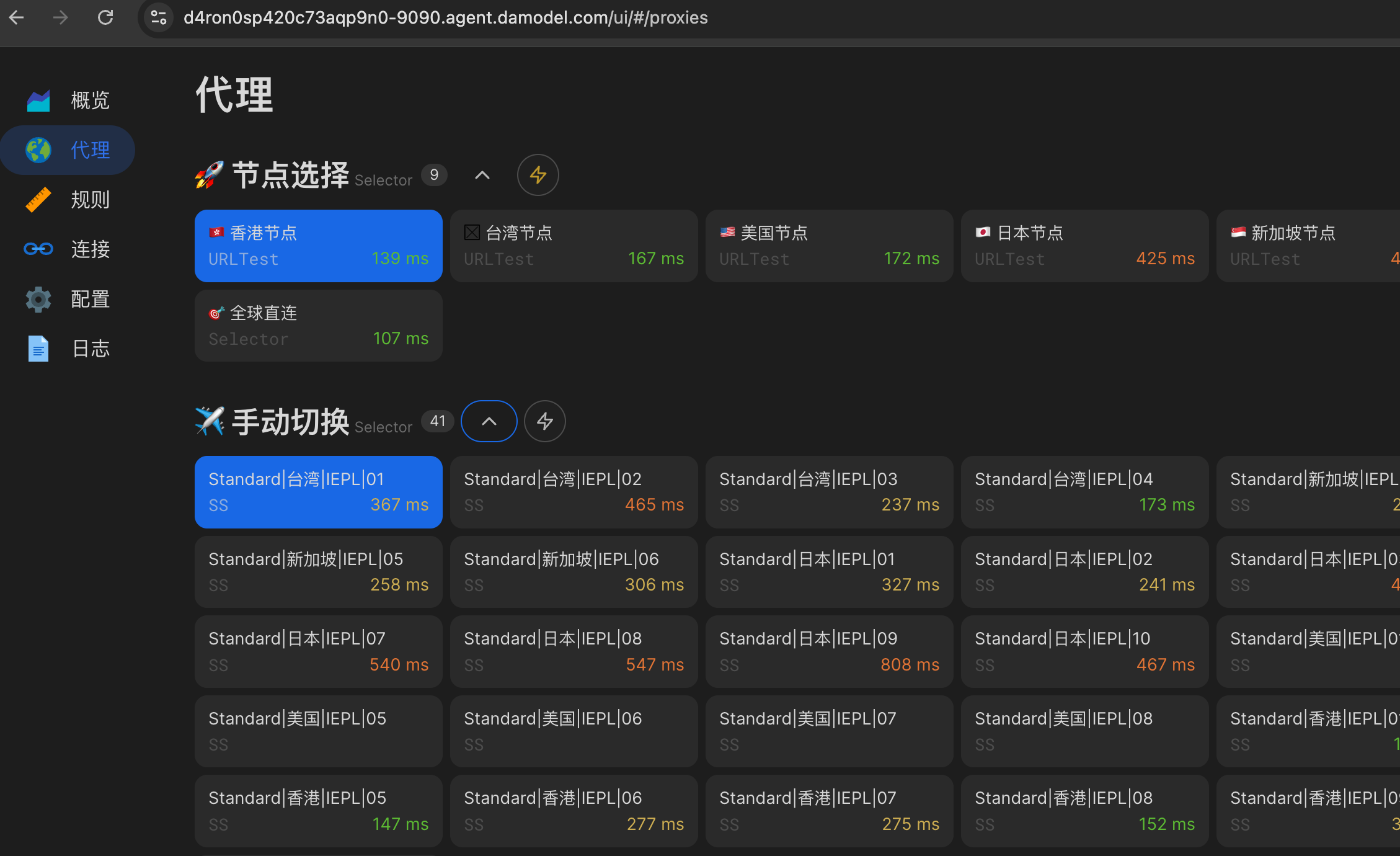
clash 安装包内置控制面板 UI,可以通过控制面板管理 clash 配置及节点信息。
- 创建自定义服务,映射实例内的 9090 端口。

- 输入丹摩生成的地址,填写连接和密码。
例如:
https://d4ron0sp420c73aqp9n0-9090.agent.damodel.com/ui
⚠️ 需要追加一个 /ui 后缀。

- 操作控制面板
😅 搞不定
如果遇到问题,请联系丹摩的技术客服。